

v1.2.22
Sessions
- Live Preview - Ask the agent to run your app’s dev server and preview the running app from the session via Local Servers — see Live Preview
v1.2.21
Sessions
- Transfer Chats to Local - Continue any session in Claude, Codex, Cursor, Zed, ChatGPT, or any other agent via ⋯ → Transfer Chat, powered by the Blocks skills — see Transfer Chats to Local
Automations & PR Review
- Non-Failing CI Checks - Turn off Fail CI check on agent determination on an automation’s CI check trigger or in Settings → PR Review to have the check report success regardless of the agent’s verdict — see Automations and PR Review
v1.2.20
AWS Integration
- OIDC Support - Connect AWS without long-lived access keys. Add a connection under Settings → Workspace Integrations → AWS, choose OIDC (Recommended), and Blocks walks you through creating the identity provider and role in IAM — see AWS
- Multiple Cloud Connections - A workspace can now hold up to 5 AWS connections, each via OIDC or access keys, with one set as the default
v1.2.19
Agents
- Multiple Subscriptions per Workspace - A workspace can now hold several Anthropic or OpenAI subscriptions instead of one. Add them under Settings → Workspace Integrations → Anthropic or OpenAI, and name each one as you connect it. Blocks picks the subscription with the lowest usage for each session, so work spreads across them instead of exhausting one. Personal subscriptions still take priority for your own sessions, and now fall back to the workspace subscriptions once their usage runs out — see Claude Code and Codex
v1.2.18
Agents
- New OpenAI Subscription Flow - Connect a ChatGPT subscription with Sign in with ChatGPT in Settings → Workspace Integrations → OpenAI: open the link, enter a short device code, and Blocks completes the connection — no more copying
~/.codex/auth.json. Existing connections keep working and can be moved over with Reconnect. Enable device code authorization for Codex in ChatGPT Security Settings first — see Codex
v1.2.17
Agents
- Blocks Auth Mode - Select “Blocks” as the authentication method on Claude Code, Codex, OpenCode, Kimi Code, and Sisyphus to run Claude, GPT, Kimi, and GLM models on Blocks LLM credits with no provider API key to manage
- GLM 5.3 on Claude Code - Run
z-ai/glm-5.3through Claude Code with the Blocks authentication method - OpenCode Zen & Go - Authenticate OpenCode against OpenCode Zen or OpenCode Go with your own
OPENCODE_API_KEY - New Anthropic Subscription Flow - Connect a Claude subscription by running
claude setup-tokenand pasting the token in Settings → Workspace Integrations → Anthropic, with no more periodic re-authorization
Sessions
- Forking Sessions - Fork any session into a new one and run it with a different agent or model
Git
- Open All PRs As - Choose whether agent-created pull requests open as Draft or Ready for review from Settings → Git; the setting applies to every pull request Blocks opens in the workspace
PR Review
- Review on Request - Comment on a pull request asking for a review in plain language, for example
@blocks review this PR, and Blocks runs the full PR review workflow with no slash command required - Skip Draft Pull Requests - Automatic reviews can skip draft PRs and run once the pull request is marked ready (GitHub and GitLab only)
- Comment Severity Threshold - Set the minimum issue severity a review will comment on, from 1 (everything) to 10 (blockers only), under Settings → PR Review
v1.2.16
Sessions
- Saved Session Filters - Session filter preferences now load from workspace-user metadata, can be saved or reset from the filter menu, and default to showing all creators unless you save or explicitly select Created by Me
- Main Panel Session Grouping - The main panel now remembers your session grouping preference per workspace user
- Sessions Table Filter Preferences - The full sessions page now uses the same saved workspace-user filter preferences and supports saving filters directly from its filter dropdown
Pull Requests
- Repository-Grouped Pull Requests - Session properties now groups associated pull requests by repository, parses GitHub and Bitbucket URLs into clearer labels, and sorts pull requests by creation time
v1.2.15
REST API
- REST API Release - Blocks now includes a REST API for creating sessions, polling replies, and sending follow-ups from your own apps. Start with the REST API Quick Start, then create a session with a request like:
Sessions & UI
- Improved Linear Session Naming - Linear-linked sessions now get clearer, more consistent names
- Linear Session Grouping - Linear sessions now form session groups automatically when they share the same resource
- Creator Avatars - Sessions now show creator avatars so it is easier to see ownership at a glance
- Automation Run Visibility - Automation runs are now shown directly on their respective automation pages in Dashboard > Settings
- Auto-Archive Dialog Caching - Improved caching for the auto-archive dialog so dismissing it prevents it from reappearing for 30 minutes
Pull Requests & Integrations
- Bitbucket PR Diff Fetching - Fixed an issue preventing Bitbucket pull request diffs from fetching
- Duplicate Bitbucket PR Links - Fixed an issue where Bitbucket sessions could sometimes render duplicate pull request links
Agents & Models
- Codex 5.5 Support - Codex 5.5 is now available with both Codex and OpenCode agents
- Kimi 2.6 in OpenCode - Kimi 2.6 is now available on OpenCode
Stability & Reliability
- Improved Agent Dependency Isolation - Reduced hanging-session edge cases by improving dependency isolation between agents
v1.2.14
Optimizations
- Faster Chat Starts - Optimized chat startup speed for a snappier session launch experience
- Edge-Routed Requests - Improved global performance by routing requests through edge locations
- REST API Rate Limits - Updated REST API rate limits to
100requests per minute
Agents
- Sisyphus Plugin Version Pinning - Fixed issues with Sisyphus by pinning plugin versions more reliably
- Reliable PR Registration - Improved pull request registration stability for long-running sessions
- Kimi 2.6 Compatibility - Fixed Kimi Code issues when using Kimi 2.6
- Kimi Code Error Handling - Improved error handling for Kimi Code
- Kimi Code Restart Fixes - Fixed agent restart issues in Kimi Code
- Claude Code 1M Context Support - Added support for Claude Code models with a 1 million token context window
- Opus 4.7 on Bedrock - Fixed Opus 4.7 support for Claude Code on Bedrock
- Sub-Agent Visibility - Claude Code now surfaces more SubAgent activity
v1.2.13
Custom MCP Servers
- Improved MCP Settings - Added rename support, clearer required environment variable actions, and a more polished loading and save flow
Sessions & Models
- Shared Session Filters - Session filters now stay in sync between the main panel and sessions table
- Profile-Based Model Sync - Session model selection now follows the latest profile-based model changes more reliably
Pull Requests & UI
- Improved PR Performance - Large pull request diffs render more smoothly with better chunking and tab behavior
- UI Polish - Improved page titles and Vercel preview link handling
v1.2.12
Sessions & Navigation
- Improved Navigation Performance - Page loads across the app are now faster
Pull Requests & UI
- Improved PR Panel - Added inline diff rendering with better handling for large files and multi-PR sessions
- UI Polish - Fixed mobile layout issues and improved markdown wrapping in chat
v1.2.11
Platform & Workspace
- Updated Atlassian OAuth Scopes - Refined Atlassian OAuth permissions to support the latest integration requirements
- Workspace-Level Git Configuration - Workspace admins can now configure a fallback git commit email for unmapped sessions or users without a personal git email configured
- Disable Private Sessions - Added a workspace admin setting that disables private sessions
- Hide the Game - Added a workspace user setting to hide the game
Sessions & Integrations
- Rename Sessions - Sessions can now be renamed
- Enhanced Linear Attachments Support - Improved handling for Linear attachments
Agents & Models
- Model Selection Across Blocks - You can now choose the model used for sessions, automations, and PR review runs, and sessions now support switching models mid-session
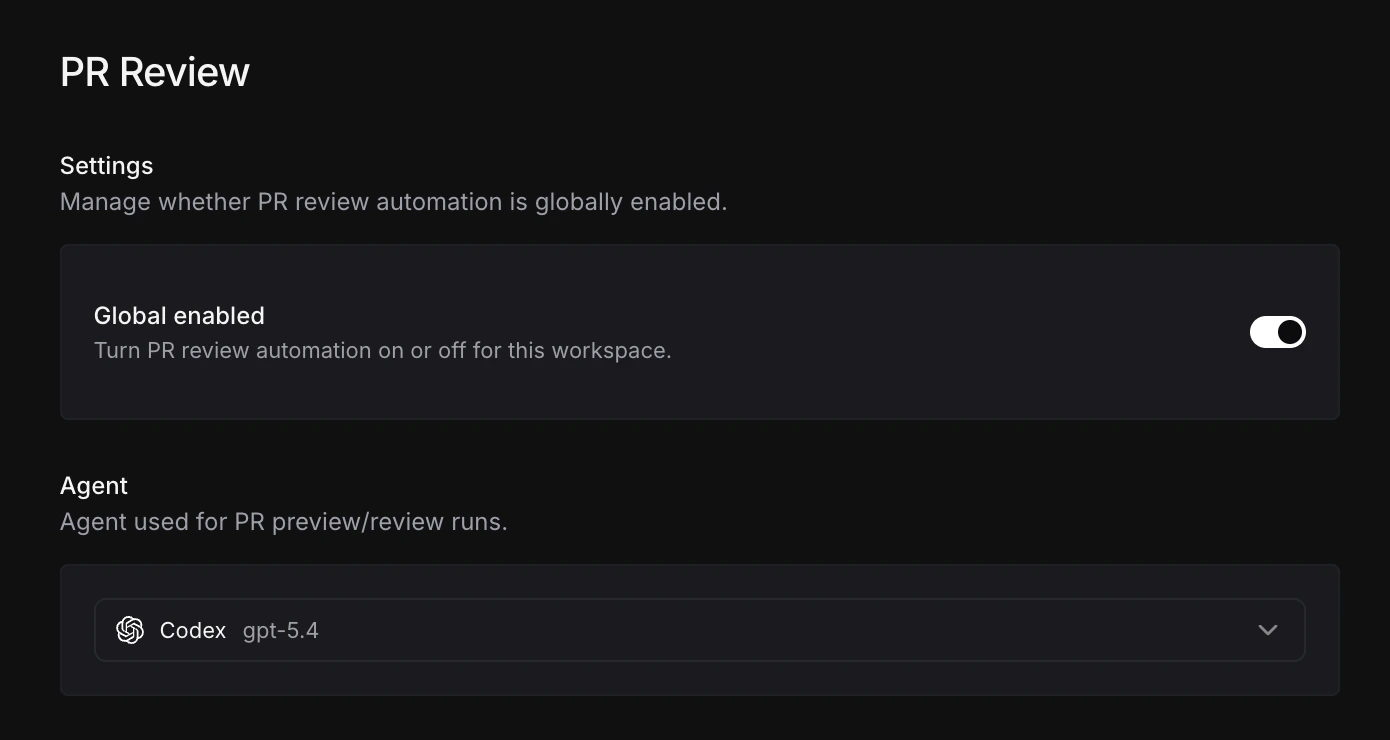
- Opus 4.7 Support - Added support for Opus 4.7
- Codex 5.4 Support - Added support for Codex 5.4
- Gemini Support in OpenCode - OpenCode now supports Gemini
- Kimi 2.6 in Kimi Code - Added support for Kimi 2.6 in Kimi Code
- Safe Image Read Tool for Claude Code - Added a safe image read tool for Claude Code that prevalidates images and rejects problematic reads that could otherwise corrupt a session due to an open Claude Code issue
Stability & Reliability
- Claude Code Refresh Tokens - Improved refresh token stability with Claude Code
- Gemini CLI Stability - Improved Gemini CLI agent stability
- OpenCode Error Handling - Improved error handling for OpenCode
v1.2.10
PR & Integrations
- PR Panel - View file diffs, commits, checks, comments, statuses, and Vercel previews without leaving Blocks
- GitLab Merge Request Support - Enables GitLab PR review and automations
- Installer Actor Mentions (GitLab/Bitbucket) - The user who authorizes the Blocks integration can now be directly mentioned instead of
@blocks; as mentioned previously, creating a dedicated integration user for GitLab and Bitbucket is still recommended - Workspace-Specific Linear Accounts - Connected Accounts now lets you link a different Linear account for each workspace
- Clearer Integration Selection - Updated guidance on when user integrations are used across the Anthropic/OpenAI integration pages and Claude Code/Codex agent pages
v1.2.9
Docs
- Attachment Support - You can now upload attachments directly to Blocks sessions
- OpenCode Onboarding (Kimi Key) - Support for
KIMI_API_KEYwith OpenCode during onboarding - Installation Profiles - Create a model/MCP configuration with a custom slash command (for example,
@blocks /claude-fastmapped to Claude Code with Haiku)
v1.2.8
Custom MCP Servers
- JSON Configuration - Define MCP servers directly in the Blocks dashboard using a JSON object specifying the command, arguments, and environment variables
- Environment Variable Injection - Reference global environment variables in your MCP config using
${env:VARIABLE_NAME}— Blocks resolves these at runtime so secrets are never hardcoded - Workspace-Wide - MCP servers are available across your entire workspace and can be enabled or disabled per agent
- Variable Helper - A dropdown in the MCP server editor lists your global environment variables and copies the correct template string for you
Bug Fixes
- Improved user integration usage to stabilize Anthropic and OpenAI user integrations
v1.2.7
Git Configuration
- Commit Author Email - Set a custom email address to use as the commit author across your Blocks sessions from Dashboard → Settings → Git
- Per-User Setting - This is a personal configuration and does not affect other workspace members
- Vercel Build Previews - Setting your commit email to an address in your GitHub, GitLab, or Bitbucket organization enables Vercel to create build previews for PRs opened by Blocks
GitHub Bot Invocations
- New Setting - Enable bot user invocations from Dashboard → Settings → GitHub, allowing GitHub bot users to mention Blocks and create sessions
- Disabled by Default - Bot invocations are off by default and must be explicitly enabled per workspace
Bug Fixes
- Fixed an issue where Linear agent sessions were not being mapped to the correct workspace user
v1.2.6
Automations
- Event-Driven Agent Runs - Trigger coding agents automatically on GitHub PRs, GitLab MRs, Bitbucket PRs and pushes, GitHub Actions failures, and scheduled intervals — no manual mention required
- Custom Prompts - Write a prompt per automation that the agent receives whenever the trigger fires
- Repository Scoping - Scope automations to specific repositories or run across all connected repos
- CI Check Display - Show automation results as a native CI check on pull requests, blocking merges until the automation passes
- Workspace or Private Visibility - Share automations across your workspace or keep them private
PR Review
- Automatic PR Reviews - Run a coding agent on every pull request across your connected repositories without any manual mention
- Per-Repo Control - Enable or disable reviews for individual repositories from a single settings page
- Custom Review Instructions - Add a
.blocks/review.mdfile to a repository to customize what the agent looks for in that repo’s PRs - Agent Selection - Choose any configured agent for reviews
- Supported Platforms - Works with GitHub, GitLab, and Bitbucket
Global Configuration
- Global Configuration Repository - Set any connected repository as your workspace’s global configuration repo from Settings → Global Configuration
- Automatic Loading - Every Blocks session will automatically load Skills, Hooks, and Sub-Agents from the configured repository at runtime
v1.2.5
Session Groups
- Linked Sessions - Sessions that share a common resource (such as a Linear issue, GitHub PR, or Slack thread) are now automatically grouped together
- View Related Sessions - Open the session properties panel on any session page to see other sessions in the same group
- Filter by Resource - Adjust the sessions list filters to group by resource, giving you a consolidated view of all activity around a specific issue, PR, or thread
v1.2.4
Organization Workspaces
- Self-Serve Creation - Create an organization workspace anytime from the workspace switcher in the bottom-left of the dashboard — no onboarding required
- Role-Based Access - Invite team members as Admins or Members, with admins controlling what members can see and do
- Admin Controls - Restrict member visibility into API keys, environment variables, integrations, analytics, and more from Settings → Permissions
- Workspace Isolation - Repositories, skills, sessions, and settings are fully isolated between workspaces
UI Revamp
- Refreshed Dashboard - Updated visual design across the dashboard for a cleaner, more consistent experience
- Workspace Switcher - New workspace switcher in the bottom-left sidebar for faster context switching
v1.2.3
Kimi Code Agent
- Moonshot AI Integration - Kimi Code is now available in Blocks, powered by Moonshot AI’s Kimi models
- API Key Configuration - Connect your Kimi API key from the Blocks dashboard under Agents → Kimi Code
- Invoke via Slash Command - Use
/kimito run Kimi Code on any request, or set it as your default agent - Experimental Status - Available now as an experimental agent
v1.2.2
Cursor CLI Agent
- Premium Models - Access Composer, GPT-5.2-codex, Claude 4.5 (Sonnet/Opus), and Gemini 3 Pro through a single subscription
- Subscription Model - Requires Cursor Pro or Team subscription with API key
- Invoke via Slash Command - Use
/cursorto invoke (cannot be set as default agent)
Support for PR Skills & Hooks
- Agent PR Creation Skills - Define custom agent skills for pull request creation with personalized templates and workflows
- PR Hooks Support - Configure hooks to customize pull request templates and defaults
- Draft Mode Control - Set default draft mode and other PR settings through custom skills or hooks
.claude/skills/SKILL.md
v1.2.1
Sisyphus Agent
- Multi-Agent Orchestration - Introducing Sisyphus (Oh My OpenCode), a sophisticated orchestration system that coordinates multiple specialized agents
- Specialized Agent Team - Main Conductor (Claude Opus 4.5), Oracle (GPT-5), and Backend Specialist (Claude Sonnet 4.5) work together on complex tasks
- Complex Workflows - Ideal for full-stack feature implementation, large-scale refactoring, and multi-file changes requiring domain expertise
- Claude Code Compatibility - Built with compatibility layer for seamless integration
- API Key Configuration - Supports both Anthropic and OpenAI API keys for full capabilities
- Experimental Status - Available now as an experimental agent via
/sisyphusslash command
v1.2.0
OpenCode
- You can now use OpenCode in Blocks!
- OpenAI and Anthropic API Key Support - Configure OpenCode with your OpenAI or Anthropic API keys
Database Integration
- Postgres Support - Connect a Postgres database to your Blocks workspace
- Bastion Connection - Secure database connections through SSH bastion hosts with support for private keys and credentials
Linear Integration
- Default Assign Mode - Configure the default mode (Edit or Plan) when assigning Linear tickets to agents, streamlining your workflow
Infrastructure
- GitHub Token Refresh - Improved GitHub token refresh mechanism in agent sandboxes for more reliable authentication
v1.1.0
Plan Mode
Now you can create a plan before implementation happens:- Mode Switching - Toggle between Plan and Edit mode when creating a new session from the dashboard, Slack, GitHub, and Linear
- Plan Visualization - See your implementation plan displayed clearly in the session
- Make Changes - Work with the agent to update the plan
- One-Click Implementation - Implement planned changes with a single button
- Use Anywhere - Run plan mode from the Dashboard, GitHub, Slack, and Linear
Post-Clone Scripts
- Add a
.blocks/post-cloneor.blocks/post-clone.shwith one or more shell commands directly in your repository:
Claude Code Hook and Skills Support
- Read directly from
.claudefolders in cloned repositories
Enhanced File Viewer
- Inline File Viewing - View files directly in chat conversations
- Full-Screen Mode - Dedicated full-screen viewer for focused file review
Enhanced TODOs
- Collapsible TODO List - View all in-progress TODOs directly above your message box in a session
- Reduce Clutter - TODO updates no longer clutter your main chat history
AWS Integration
- Credential Configuration - Set up AWS access keys and secrets from the settings page
- OIDC Support Coming Soon
- Bedrock API Keys - Claude Code can now be configured to use an AWS Bedrock API key
Linear Integration
- Default Team Configuration - Set a default Linear team for new issue creation, overwrite by specifying a specific team
Other Improvements
- Session Details - View creation dates for all your sessions in the sidebar
- Unarchive Sessions - Restore archived sessions when needed
- GitHub Branches - Quick access to branches from the GitHub menu in message box command menus
- Preserved Redirects - Return to your intended page after signing in when visiting an unauthenticated link
- Improved User Management - Filtered non-human users from the Linear claim user dialog